Optimierung der Suchgeschwindigkeit von Outlook 2010 unter Windows Vista / 7
Start > Systemsteuerung
Energieoptionen > Energiespareinstellungen ändern
Erweiterte Energieeinstellungen ändern > Suche und Indexierung > Energiesparmodus
Einstellung : auf ,hohe Leistung" stellen.
Mit dem nachfolgendem Befehl wird SMTP-Out erlaubt
1) esxcfg-firewall -o 25,tcp,out,SMTP
Windows blendet jedes Mal eine Fehlermeldung ein, wenn ein zuvor eingebundenes Laufwerk nicht mehr gefunden wird. Wer davon genervt ist, kann die Meldungen über einen Eintrag in der Registry abschalten.
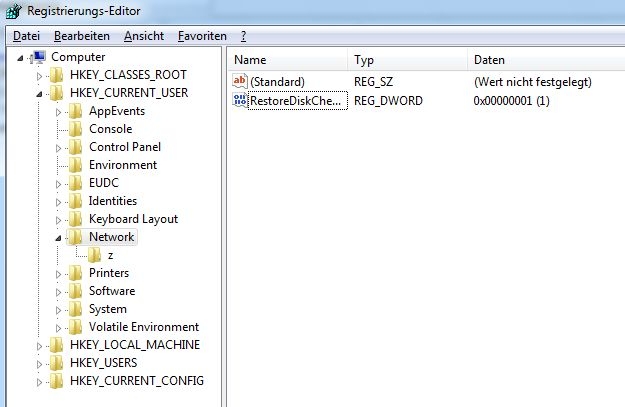
Wenn Windows ein einmal eingebundenes Netzwerklaufwerk nicht mehr findet, meldet es das dem Nutzer. Um die Fehlermeldung abzuschalten, klicken Sie bei Windows auf Start und tippen in der Suchbox den Begriff regedit ein. Es startet der Registrierungs-Editor.
Navigieren Sie nun zu dem Eintrag "HKEY_CURRENT_USER\Network".
Dort muss anschließend ein neuer DWORD-Wert mit der Bezeichnung RestoreDiskChecked angelegt werden.
Ist der Wert auf "0" gesetzt, wird die Warnung deaktiviert.
Wer die Funktion wieder anschalten will, der setzt den Wert auf "1".
Der Trick funktioniert mit allen aktuellen Versionen von Windows.
1) /etc/init.d/vmware-webAccess start
2) chkconfig vmware-webAccess on
1) cd /etc/ssh
2) nano sshd_config
3) PermitRootLogin auf yes setzen
4) Dokument speichern
5) service sshd restart oder Server neu starten
Backup-Script mit RoboCopy
:START
SET RoboCopyPath=C:\Windows\System32\Robocopy.exe
SET SourceDir="C:\Users\Fidan.Jahiji.FIMA"
SET DestinationDir="P:\Temp"
SET LogFile=C:\log_bkp_DocsAndSettings.txt
REM See the robocopy documentation for what each command does.
REM /COPY:DAT :: COPY file data, attributes, and timestamps
REM /COPYALL :: COPY ALL file info
REM /B :: copy files in Backup mode.
REM /MIR :: MIRror a directory tree
REM /L :: Just list the info, don't actually do it
SET HowToCopy=/COPY:DAT
REM Exclude some files and directories that include transient data
REM that doesn't need to be copied.
SET ExcludeDirs=/XD "Temporary Internet Files" "Cache" "Recent" "Cookies" "iPod Photo Cache" "MachineKeys" "All Users" "Default User" "LocalService" "NetworkService" "Application Data" "Local Settings" "My Recent Documents" "NetHood" "PrintHood" "SendTo" "Templates"
SET ExcludedFiles=/XF *.bak *.tmp index.dat usrclass.dat* ntuser.dat* *.lock *.swp
REM Refer to the robocopy documentation for more details.
REM /R:n :: number of Retries
REM /W:n :: Wait time between retries
REM /LOG :: Output log file
REM /NFL :: No file logging
REM /NDL :: No dir logging
REM /E :: Include Empty Subdirectories
REM /XA:H :: Excludes files with hidden attribute
REM /XJ :: Exclude Junction Points (prevents recursive Application Data loop in Vista)
SET Options=/R:1 /W:1 /LOG+:%LogFile% /NFL /NDL /E /XJ
REM Execute the command based on all of our parameters
%RoboCopyPath% %SourceDir% %DestinationDir% %HowToCopy% %Options% %ExcludeDirs% %ExcludedFiles%
pause
:END